
Your available kash balance appears in the top navigation. Select it to open My Kash and track your earnings and reward status.
Scroll to the History section to see a detailed record of your activity, including earnings, reward statuses, and Kash Out requests.
Things to know
Some earnings are available right away, while others remain pending until verified.
Most advertisers verify earnings within 14–31 days, though it may take longer.
Kash Out requests are typically approved within 1–3 business days.
My Kash Earnings
Your kash earnings are organized into categories on the My Kash page.
Available Balance | Kash available for Kash Out* |
Total Balance | Available and pending kash |
Pending | Kash awaiting verification with advertisers (typically 3-14 days, sometimes 31+ days) |
Lifetime | All the kash you've earned since joining KashKick |

*Kash Out requires at least $10 in your available balance, with a $10 minimum withdrawal.
History
The History section is your go-to for activity, earnings, and withdrawal records.
Android and iOS apps
Android and iOS apps
Tap the kash amount on the top navigation bar to open My Kash.
Scroll to History.
View All or select Earnings, Referrals, or Kash Outs.

Web
Web
Click the kash amount on the top navigation bar to open My Kash.
Scroll to History.
View All or select Earnings, Referrals, or Kash Outs.
At kashkick.com, Type identifies the activity as a withdrawal (Kash Out), earning, or giveaway.
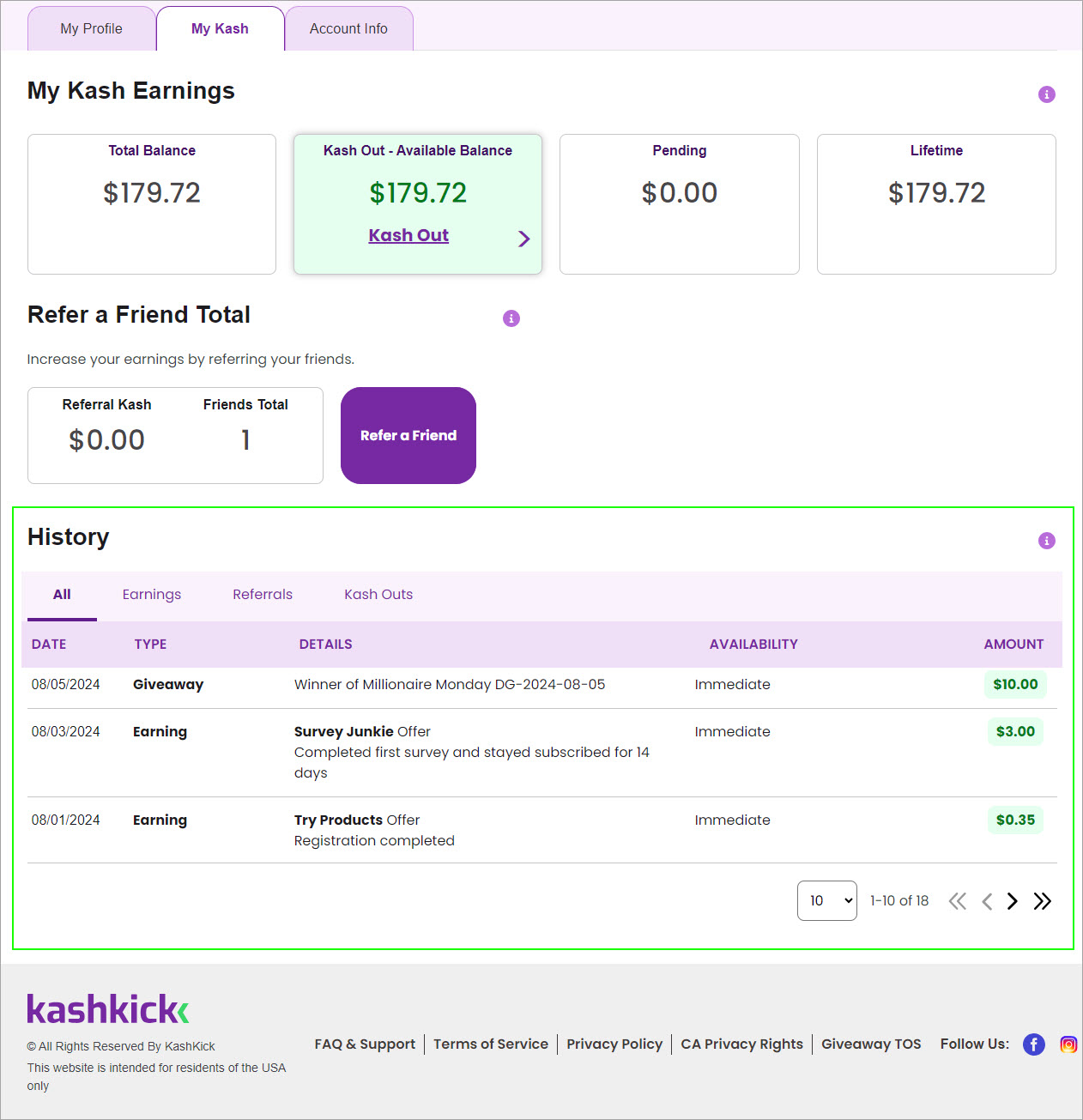
Transactions are listed by date and grouped in tabs.
All | All your activity in KashKick, listed by type |
Earnings | Earnings from games, surveys, deals, shopping, & giveaways |
Referrals | Only earnings from referred friends |
Kash Outs | Kash Out requests |
Earnings status
To check a reward’s status, go to your History.
In the KashKick app, status is noted by Funds Release.
On kashkick.com, status appears under Availability.
Immediate | Available for Kash Out |
Pending | Awaiting verification |
[Date] | Funds release date |
Ineligible | Purchase was canceled, returned, or excluded from a KashBack offer |
Reversed | Earnings reversed due to ineligibility |
Canceled | Request or earning canceled due to ineligibility or exclusions |
If your earnings record appears incorrect, such as a game or deal reward being missing or delayed, it may be due to tracking issues. Check your game or deal progress, then confirm that your tracking settings are correct. For help, see Fix issues with tracking, Tracking for Android, or Tracking for iOS.
For details on the status of KashBack shopping rewards, see KashBack for iOS or KashBack for Chrome & Edge.
Kash Out status
Kash Out status indicates how far along your withdrawal request is in the approval and deposit flow, or if an issue was encountered. Statuses vary by Kash Out type.
Status | Kash Out type | Description |
Requested | KashRewards, PayPal, Venmo | Pending approval |
Approved | PayPal, Venmo | Approved |
Confirming | PayPal | Confirming PayPal account |
Canceled | KashRewards, PayPal, Venmo | Canceled due to inaccurate account info, ineligibility, or by user request |
Returned | PayPal | Returned due to inaccurate account info |
Unclaimed | PayPal | Unclaimed PayPal account |
Success | KashRewards, PayPal, Venmo | Transaction complete |